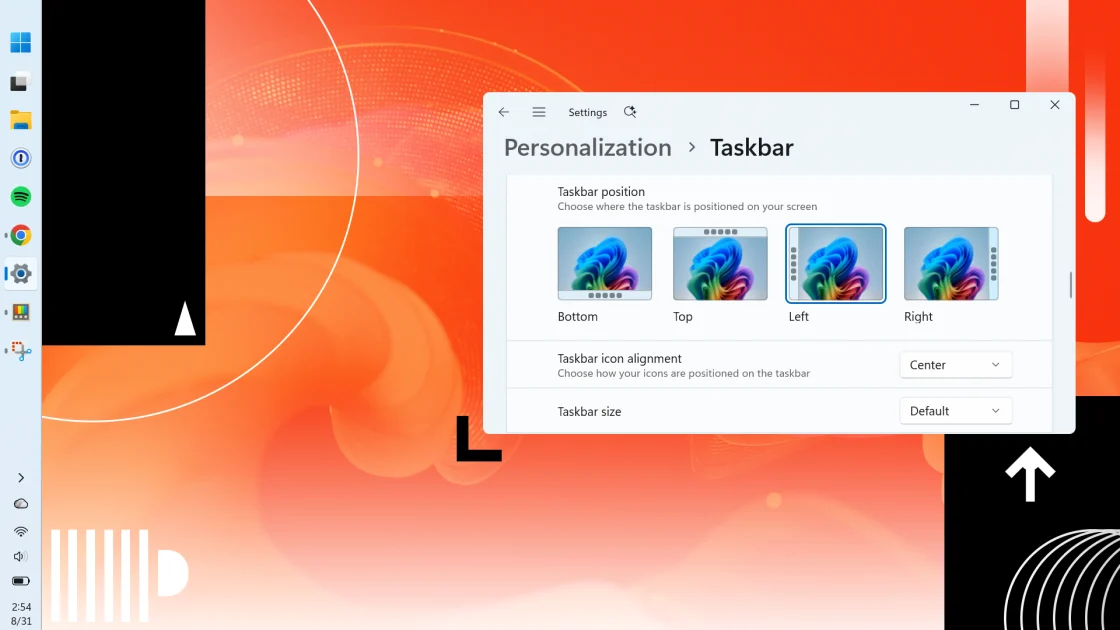
For years, the rigid design of the Windows 11 taskbar served as a primary grievance for power users and enthusiasts who felt Microsoft had ignored their preferences. By locking the bar to the bottom of the screen, the company stripped away a customization staple that had existed for decades. However, that era of restriction is finally ending. Starting next Tuesday, Microsoft will begin rolling out an update that restores the ability to move the taskbar to the left, right, or top edges of the screen, alongside new options to shrink its size for those seeking more usable screen real estate.
The update extends beyond mere aesthetics, tackling several other long standing frustrations regarding user autonomy. In a move that should please anyone tired of cluttered search results, users will now be able to disable Bing and Store integration within the Start menu, limiting searches strictly to local files. Additionally, the Start menu itself is becoming more flexible with new toggles allowing users to hide specific sections like Recommended or Pinned items. These changes signal a broader shift toward listening to community feedback, reducing the need for third party modification tools that were once essential for personalizing the OS experience.
While these features are currently appearing in preview builds through optional updates, most users can expect them during the official Patch Tuesday rollout on September 8th. It is important to note that Microsoft plans a gradual deployment, meaning some PCs will receive these capabilities immediately while others may wait weeks or months due to a randomized activation process. Early testers have reported minor glitches involving mouse cursors in the preview versions, though these are expected to be ironed out before the general public receives the stable build.
Beyond the interface overhaul, Microsoft is easing its aggressive push toward integrated services. A new opt out feature for OneDrive backups allows users to decline cloud prompts indefinitely rather than being reminded every few days. Meanwhile, productivity seekers can look toward PowerToys version 0.101 for a new tool called Window Hopper. Borrowing a popular concept from macOS, this utility introduces an Alt plus grave accent shortcut that lets users cycle specifically through windows within a single application rather than juggling every open program on their system.